Build the PFP/hydrogel model by hand
亲手构建 PFP/水凝胶模型
COMSOL 6.4 desktop instructions. Each numbered card tells you where to click, what to enter, and how to check it. Complete one card before moving down. English menu labels are retained beside the Chinese explanation.
本教程使用 COMSOL 6.4 桌面界面。每张编号卡明确点击位置、输入内容和核对办法;做完一张再向下。英文菜单名称与中文解释并列保留。
A · Blank model and reference geometry
A · 空白模型与参考几何
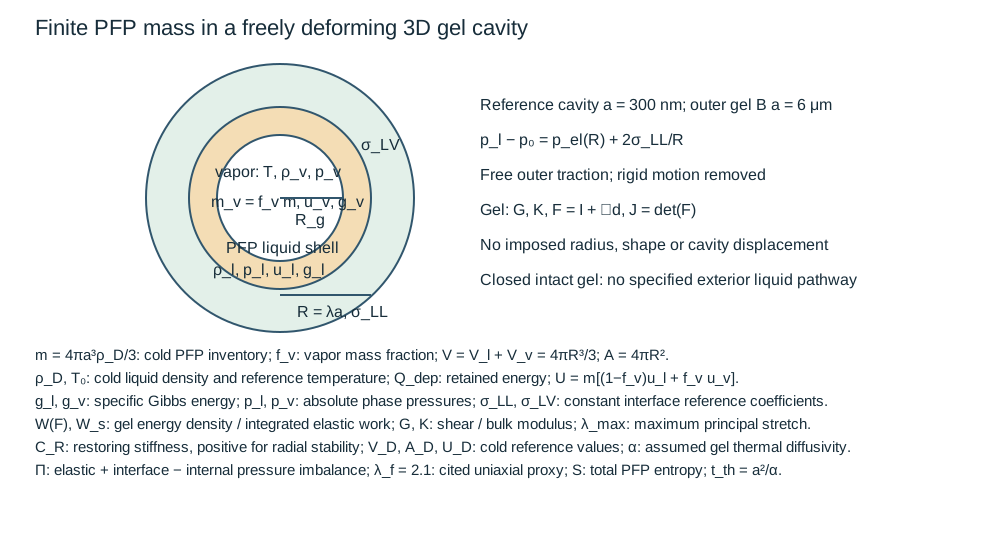
Build this in a separate model window from Model A. It is a stationary equilibrium of one PFP inclusion inside a freely deforming gel. The PFP state is represented by global equations; only the gel is meshed. You will not draw a separate vapor sphere or prescribe a cavity displacement.
在与模型 A 分开的新模型窗口中操作。本模型求解一个 PFP 包含物与自由变形凝胶的稳态平衡。PFP 相态由全局方程表示,只对凝胶划分网格;不另画汽核球,也不指定空腔位移。
01 Open a new model
打开一个新模型
Launch COMSOL Multiphysics 6.4 from the Windows Start menu. On the New page click Model Wizard. If a model is already open, use File → New → Model Wizard and keep your existing work saved in its own file.
从 Windows 开始菜单启动 COMSOL Multiphysics 6.4,在 New 页面点击 Model Wizard(模型向导)。若已有模型打开,用 File → New → Model Wizard;先将已有工作保存在自己的文件中。
You should see: The Select Space Dimension page is visible.
应当看到:看到 Select Space Dimension(选择空间维度)页面。
02 Choose 3D
选择 3D
On Select Space Dimension, click 3D.
在 Select Space Dimension 页面点击 3D。
You should see: The Select Physics page opens.
应当看到:打开 Select Physics(选择物理场)页面。
Why this choice: The accepted model solves fields in all three spatial directions. 2D axisymmetric would be a different model.
为何这样设置:已验收模型在三个空间方向求解场;二维轴对称属于另一个模型。
03 Add Solid Mechanics
添加 Solid Mechanics
In Select Physics, expand Structural Mechanics → Solid Mechanics, select the final interface, and click Add. You can also type the final interface name in the search field and select the matching interface. Adding one interface does not automatically add the next one.
在 Select Physics 中展开 Structural Mechanics → Solid Mechanics,选中最后的接口并点击 Add(添加)。也可在搜索框输入最后的接口名称,选中对应结果。添加一个接口不会自动添加下一个。
You should see: The interface appears in Added physics interfaces.
应当看到:该接口出现在 Added physics interfaces(已添加物理场接口)列表。
If this does not work / 如果这一步不成功
If the interface is missing, clear the search filter and confirm the dimension. For Hyperelastic Material, verify a licensed nonlinear structural product is available.
若接口缺失,清空搜索过滤并检查空间维度。Hyperelastic Material 还需要相应的非线性结构许可。
04 Add Global ODEs and DAEs
添加 Global ODEs and DAEs
In Select Physics, expand Mathematics → ODE and DAE Interfaces → Global ODEs and DAEs, select the final interface, and click Add. You can also type the final interface name in the search field and select the matching interface. Adding one interface does not automatically add the next one.
在 Select Physics 中展开 Mathematics → ODE and DAE Interfaces → Global ODEs and DAEs,选中最后的接口并点击 Add(添加)。也可在搜索框输入最后的接口名称,选中对应结果。添加一个接口不会自动添加下一个。
You should see: The interface appears in Added physics interfaces.
应当看到:该接口出现在 Added physics interfaces(已添加物理场接口)列表。
If this does not work / 如果这一步不成功
If the interface is missing, clear the search filter and confirm the dimension. For Hyperelastic Material, verify a licensed nonlinear structural product is available.
若接口缺失,清空搜索过滤并检查空间维度。Hyperelastic Material 还需要相应的非线性结构许可。
05 Choose the study type
选择研究类型
Click Study. Under General Studies, select Stationary, then click Done.
点击 Study(研究),在 General Studies(一般研究) 中选 Stationary,再点击 Done(完成)。
You should see: Model Builder contains a Component and Study 1 → Stationary.
应当看到:Model Builder(模型开发器)中出现 Component 与 Study 1 → Stationary。
06 Name the component scope
设置组件作用域名称
Click Component 1. At the top of Settings set Name to c and Label to c: practice rebuild. Keep the SI unit system. Name defines the expression prefix; Label only changes the visible tree caption.
点击 Component 1(组件 1)。设置顶部 Name 为 c,Label 为 c: practice rebuild,单位制保持 SI。Name 决定表达式前缀;Label 只改变树上显示文字。
You should see: Expressions from this component can be addressed as c.variable.
应当看到:该组件表达式可以用 c.variable 访问。
If this does not work / 如果这一步不成功
If your component is still comp1, either correct Name now or consistently replace every component prefix in result expressions. This walkthrough uses the given Name.
若组件仍叫 comp1,应现在改 Name;否则必须一致替换结果中的全部组件前缀。本教程使用所给 Name。
07 Save a checkpoint
保存检查点
Choose File → Save As. Save as Model_B_my_rebuild.mph in your own practice folder. For subsequent cards use Ctrl+S. Keep the accepted delivered models as reference files.
选择 File → Save As(另存为),在自己的练习文件夹保存为 Model_B_my_rebuild.mph。后续操作用 Ctrl+S 保存。保留已经交付的模型作为参考。
You should see: The title bar shows your new practice filename.
应当看到:标题栏显示新的练习文件名。
08 Enter the parameters
输入参数
In the left Model Builder, expand Global Definitions, then click Parameters 1. In Settings, type each Name and Expression into a row. Press Tab to move to the next cell. For the long table, click Load from File below the table, choose GUI_B_parameters_import.txt after saving it locally, and click Open. Use this headerless file rather than a TSV with column headings. Import once; when adding a component, append only the new names and keep earlier parameters.
在左侧模型开发器展开 Global Definitions(全局定义),点击 Parameters 1(参数 1)。在设置表中逐行输入 Name 与 Expression,按 Tab 切换单元格。长表可先将链接文件保存到本机,点击表格下方 Load from File(从文件加载),选择 GUI_B_parameters_import.txt,然后 Open。使用无表头文件,只导入一次;添加组件时只追加新名称,保留此前参数。
You should see: All 20 entries listed here are present. The Value column evaluates expressions in SI units when their dependencies have been created.
应当看到:此处列出的 20 项均在表中。依赖项建立后,Value 列会显示 SI 制计算值。
Why this choice: Parameters are prescribed inputs. The solver will calculate dependent variables separately.
为何这样设置:参数是指定输入;待求的未知变量由求解器另行计算。
If this does not work / 如果这一步不成功
A red Name often means a duplicate. Remove the duplicate row rather than changing the expression name. A temporarily unresolved function call becomes valid after its function is added in the next cards.
Name 变红通常表示重名,应删除重复行,保留本教程的名称。尚未创建的函数会暂时无法求值,后续创建后即可恢复。
| Name / 名称 | Expression / 表达式 | Meaning / 含义 |
|---|---|---|
| a | 300[nm] | Reference cavity radius |
| B | 20 | Outer radius / cavity radius |
| BK | 1000 | Bulk/shear modulus control |
| G | 10[kPa] | Reference PAAm shear modulus; E approximately 30 kPa |
| lam | 1.8 | Analytic verification target and initial guess only; no displacement constraint |
| sigTest | sigLL | Reference constant surface energy coefficient |
| pLoad | G/2*(5-4/lam-lam^(-4))+2*sigTest/(a*lam) | Known pressure for the independent spherical elastic/capillary control |
| Qdep | 11.55[pJ] | Net retained subsystem energy after supplied activation; no optical efficiency inferred |
| sigLV | 0.00941[N/m] | PFP / saturated-air room-temperature reference; heated/nanoscale use is conditional |
| nucleusFloor | a/100 | Numerical radius floor only; accepted states must be far above it |
| sigLL | 0.054[N/m] | Pure PFP/water liquid-liquid reference; actual surfactant formulation is unresolved |
| Tref | 293.15[K] | |
| rhoLref | 1621.2304497568995[kg/m^3] | |
| rhoVref | 8.781946533312483[kg/m^3] | |
| ad | a | Equivalent PFP droplet radius; distinct from the preformed cavity radius a |
| rhoD | 1623.3028161533516[kg/m^3] | |
| mp | 4*pi*ad^3*rhoD/3 | |
| p0 | 100[kPa] | |
| sig | sigLL | Unused legacy alias: assumed PFP/gel outer coefficient; active loads use sigLL |
| lamFail | 2.1 | PAAm ultimate-stretch reference from Movahed 2016, not a certification of Li 2024 formulation |
a=300 nm is a radius; the initial diameter is 600 nm. Qdep is the retained energy after supplied activation, not the incident laser energy. lam=1.8 is an initial guess and does not impose the final radius.
a=300 nm 指半径,初始直径为 600 nm。Qdep 是给定激活后保留的能量,不是入射激光能量。lam=1.8 是初猜,不规定最终半径。
09 Create the outer gel sphere
创建凝胶外球
Click Geometry 1 and set Length unit = m. Right-click Geometry 1 → Sphere. Set Label = Outer gel, Radius = B*a and Position = 0,0,0; click Build Selected.
点击 Geometry 1,长度单位设 m。右击 Geometry 1 → Sphere,Label = Outer gel,Radius = B*a,位置为 0,0,0;Build Selected。
| Field / 字段 | Select or enter exactly / 精确选择或输入 |
|---|---|
| Radius | B*a |
You should see: Outer radius 6 μm.
应当看到:外半径为 6 μm。
10 Create the reference cavity sphere
创建参考空腔球
Right-click Geometry 1 → Sphere again. Set Label = Cavity object, Radius = a, Position = 0,0,0; Build Selected.
再次 右击 Geometry 1 → Sphere,Label = Cavity object,Radius = a,位置为 0,0,0;Build Selected。
| Field / 字段 | Select or enter exactly / 精确选择或输入 |
|---|---|
| Radius | a |
You should see: The small sphere is concentric and has radius 300 nm.
应当看到:小球与外球同心,半径为 300 nm。
11 Subtract the cavity and build the solid gel shell
减去空腔,构建实体凝胶壳
Right-click Geometry 1 → Booleans and Partitions → Difference. Objects to add = Outer gel; Objects to subtract = Cavity object; Keep input objects = off. Build Selected, then click Form Union and Build All. Leave Action = Form a union.
右击 Geometry 1 → Booleans and Partitions → Difference,Objects to add = Outer gel,Objects to subtract = Cavity object,Keep input objects 不勾选。Build Selected,再点击 Form Union → Build All,Action 保持 Form a union。
You should see: One solid gel domain surrounds an empty spherical cavity.
应当看到:一个实体凝胶域包围空球腔。
If this does not work / 如果这一步不成功
If the cavity remains a solid domain, check the subtraction selection. Do not apply Solid Mechanics to a PFP-filled sphere.
若空腔仍是实体域,检查减去的对象;不要将固体力学用于填满 PFP 的球体。
12 Create named selection cavity
创建命名选择 cavity
Right-click Component → Definitions → Selections → Box. Set the Label to cavity. Set the geometric level and box fields below. The box is a selection tool; it does not create another geometric box.
右击 Component → Definitions → Selections → Box(框)。将 Label(标签) 设为 cavity,按下表设置几何层级与坐标范围。此框用于选择,不会新增立方体几何。
| Field / 字段 | Select or enter exactly / 精确选择或输入 |
|---|---|
| Geometric entity level | Boundary |
| Include entity if | Entity inside box |
| x minimum | -1.001*a |
| y minimum | -1.001*a |
| z minimum | -1.001*a |
| x maximum | 1.001*a |
| y maximum | 1.001*a |
| z maximum | 1.001*a |
You should see: The selection list is nonempty. Inspect the highlighted geometry before continuing.
应当看到:选择列表非空;继续前检查高亮几何是否正确。
If this does not work / 如果这一步不成功
Use Entity inside box, not the default Entity intersects box. A missed factor 1.001 can drop a spherical face.
选择 Entity inside box(实体位于框内),不是默认 Entity intersects box(与框相交);漏掉 1.001 裕量可能丢失球面。
Check the cavity Box selection using boundary highlighting: all inner spherical faces are selected, no outer faces. Use named selections throughout; boundary IDs can change with meshing/geometry versions.
用边界高亮检查 cavity 框选择:全部内球面都选中、外球面未选中。后续都使用命名选择,避免依赖可能变化的边界编号。
13 Save a checkpoint
保存检查点
Choose File → Save As. Save as Model_B_geometry_my_rebuild.mph in your own practice folder. For subsequent cards use Ctrl+S. Keep the accepted delivered models as reference files.
选择 File → Save As(另存为),在自己的练习文件夹保存为 Model_B_geometry_my_rebuild.mph。后续操作用 Ctrl+S 保存。保留已经交付的模型作为参考。
You should see: Geometry and cavity selection are saved.
应当看到:已保存几何与空腔选择。
B · Constitutive law, free boundaries and initial guess
B · 本构、自由边界与初猜
14 Set the solid-interface name and displacement field
设置固体接口名称与位移场
Click the top Solid Mechanics node. Keep Name = solid, Displacement field = u with components u, v, w. Keep its default quadratic displacement discretization. This makes the supplied derivative expressions valid.
点击顶层 Solid Mechanics(固体力学),Name 保持 solid,位移场 u、分量 u,v,w。位移离散保持默认二次阶,使所给导数表达式成立。
| Field / 字段 | Select or enter exactly / 精确选择或输入 |
|---|---|
| Name | solid |
| Dependent variables | u; v; w |
You should see: Initial Values shows three displacement components.
应当看到:Initial Values 中显示三个位移分量。
15 Add the hyperelastic gel material
添加超弹性凝胶材料
Right-click Solid Mechanics → Material Models → Hyperelastic Material. Choose All domains. Set the fields below. This node overrides the default Linear Elastic Material on the gel domain. Set every displayed property source to User defined; no material-library lookup is needed.
右击 Solid Mechanics → Material Models(材料模型)→ Hyperelastic Material(超弹性材料),选 All domains,填下列字段。此节点在凝胶域覆盖默认 Linear Elastic Material。所有显示的属性来源设 User defined,无需材料库查找。
| Field / 字段 | Select or enter exactly / 精确选择或输入 |
|---|---|
| Material model | Neo-Hookean |
| Compressibility | Nearly incompressible |
| Volumetric strain energy density | Quadratic |
| Use mixed formulation | Pressure formulation |
| Specify | Bulk modulus and shear modulus |
| Shear modulus: source; value | User defined; G |
| Bulk modulus / κ | BK*G |
| Bulk modulus K: source; value, if shown | User defined; BK*G |
| Density: source; value | User defined; 1006.5[kg/m^3] |
You should see: G=10 kPa and the near-incompressible bulk modulus is 10 MPa (BK=1000). Hyperelastic Material selects the single gel domain.
应当看到:G=10 kPa,近不可压体积模量为 10 MPa(BK=1000),超弹性材料选择唯一凝胶域。
Why this choice: Large cavity stretches require finite-strain hyperelasticity. The extra pressure field reduces near-incompressible locking.
为何这样设置:较大空腔伸长需要有限应变超弹性;增加压力场可缓解近不可压锁死。
If this does not work / 如果这一步不成功
If Hyperelastic Material is absent, check the licensed structural product. If the gel still asks for Young’s modulus from a material, check that Hyperelastic Material overrides Linear Elastic Material on all domains and all active property sources are User defined.
若没有 Hyperelastic Material,检查结构产品许可。若凝胶仍要求材料库杨氏模量,检查超弹性节点是否覆盖全部域上的线弹性节点,以及有效属性来源是否全部设为 User defined。
16 Enter the initial displacement guess
输入位移初猜
Click Solid Mechanics → Initial Values 1. Set each Displacement field below on All domains. Keep initial velocity zero. Uppercase X,Y,Z are reference/material coordinates.
点击 Solid Mechanics → Initial Values 1,在 All domains 设置下列位移,初始速度保持零。大写 X,Y,Z 为参考/材料坐标。
| Field / 字段 | Select or enter exactly / 精确选择或输入 |
|---|---|
| u | (((X^2+Y^2+Z^2)^(3/2)+a^3*(lam^3-1))^(1/3)/sqrt(X^2+Y^2+Z^2)-1)*X |
| v | (((X^2+Y^2+Z^2)^(3/2)+a^3*(lam^3-1))^(1/3)/sqrt(X^2+Y^2+Z^2)-1)*Y |
| w | (((X^2+Y^2+Z^2)^(3/2)+a^3*(lam^3-1))^(1/3)/sqrt(X^2+Y^2+Z^2)-1)*Z |
You should see: Three displacement expressions are entered. They appear only in Initial Values.
应当看到:有三个位移表达式,且只在 Initial Values 中出现。
Why this choice: A good initial guess helps find the partial-vapor branch. This is not a Prescribed Displacement boundary condition.
为何这样设置:合适的初猜帮助找到部分汽化分支;这不是 Prescribed Displacement 边界条件。
17 Remove only the rigid-body modes
只去掉刚体运动模式
Right-click Solid Mechanics → Domain Constraints → Rigid Motion Suppression. Select All domains and keep Contributing points = Automatic. Keep the outer boundary Free. Do not add Fixed Constraint, Roller, Symmetry or Prescribed Displacement to this model.
右击 Solid Mechanics → Domain Constraints(域约束)→ Rigid Motion Suppression(刚体运动抑制),选 All domains,Contributing points 保持 Automatic。外边界保持 Free。此模型不添加固定、滚支、对称或指定位置约束。
You should see: The only constraint feature added is Rigid Motion Suppression; the gel outer surface is free.
应当看到:新增约束只有 Rigid Motion Suppression,凝胶外表面自由。
Why this choice: The six rigid translations/rotations need removal for a static solve, while radial deformation must remain free.
为何这样设置:稳态求解需要去掉六个刚体平移/转动模式,同时径向变形必须自由。
18 Add integration operator ic
添加Integration算子 ic
Right-click Component → Definitions → Nonlocal Couplings → Integration. Change the actual Operator name field, then choose the geometric level and named selection below. Renaming only the tree Label does not rename the operator.
右击 Component → Definitions → Nonlocal Couplings(非局部耦合)→ Integration。修改真正的 Operator name(算子名称) 字段,再选择几何层级与命名选择。只改树上的 Label 不会修改算子名。
| Field / 字段 | Select or enter exactly / 精确选择或输入 |
|---|---|
| Operator name | ic |
| Geometric entity level | Boundary |
| Selection | cavity |
| Advanced → Frame | Material (X, Y, Z) |
You should see: ic appears as the operator name. The highlighted entities match cavity.
应当看到:算子名称为 ic;高亮实体与 cavity 相符。
Why this choice: Material-frame integration keeps the reference area/volume. The deformation Jacobian is already included in the expressions.
为何这样设置:材料坐标积分保持参考面积/体积,表达式中已包含变形雅可比。
If this does not work / 如果这一步不成功
If the named selection is missing, check its entity level. A boundary selection cannot be used as a domain selection.
如果下拉框中没有对应选择,先检查其几何层级;边界选择不能用于域选择。
19 Add integration operator iv
添加Integration算子 iv
Right-click Component → Definitions → Nonlocal Couplings → Integration. Change the actual Operator name field, then choose the geometric level and named selection below. Renaming only the tree Label does not rename the operator.
右击 Component → Definitions → Nonlocal Couplings(非局部耦合)→ Integration。修改真正的 Operator name(算子名称) 字段,再选择几何层级与命名选择。只改树上的 Label 不会修改算子名。
| Field / 字段 | Select or enter exactly / 精确选择或输入 |
|---|---|
| Operator name | iv |
| Geometric entity level | Domain |
| Selection | All domains |
| Advanced → Frame | Material (X, Y, Z) |
You should see: iv appears as the operator name. The highlighted entities match All domains.
应当看到:算子名称为 iv;高亮实体与 All domains 相符。
Why this choice: Material-frame integration keeps the reference area/volume. The deformation Jacobian is already included in the expressions.
为何这样设置:材料坐标积分保持参考面积/体积,表达式中已包含变形雅可比。
If this does not work / 如果这一步不成功
If the named selection is missing, check its entity level. A boundary selection cannot be used as a domain selection.
如果下拉框中没有对应选择,先检查其几何层级;边界选择不能用于域选择。
20 Add maximum operator maxd
添加Maximum算子 maxd
Right-click Component → Definitions → Nonlocal Couplings → Maximum. Change the actual Operator name field, then choose the geometric level and named selection below. Renaming only the tree Label does not rename the operator.
右击 Component → Definitions → Nonlocal Couplings(非局部耦合)→ Maximum。修改真正的 Operator name(算子名称) 字段,再选择几何层级与命名选择。只改树上的 Label 不会修改算子名。
| Field / 字段 | Select or enter exactly / 精确选择或输入 |
|---|---|
| Operator name | maxd |
| Geometric entity level | Domain |
| Selection | All domains |
You should see: maxd appears as the operator name. The highlighted entities match All domains.
应当看到:算子名称为 maxd;高亮实体与 All domains 相符。
Why this choice: An integral over the right selection turns a local field into a scalar available to the global equations.
为何这样设置:在正确选择上积分,将局部场转换为全局方程可用的标量。
If this does not work / 如果这一步不成功
If the named selection is missing, check its entity level. A boundary selection cannot be used as a domain selection.
如果下拉框中没有对应选择,先检查其几何层级;边界选择不能用于域选择。
C · Actual surface energy and deformed cavity volume
C · 实际表面能与变形空腔体积
21 Define all surface deformation expressions
定义全部表面变形表达式
Right-click Component c → Definitions → Variables. Label = Surface energy and free cavity. Geometric entity level = Entire model. Load GUI_B_surface_variables_import.txt, or enter every row below. Keep the exact mean(d(u,X)) expressions; do not replace them by constants. Entire model is necessary because the globally integrated Rfree and Vfree must be available to the phase equations.
右击 Component c → Definitions → Variables,Label = Surface energy and free cavity。几何层级设为 Entire model(整个模型),加载 GUI_B_surface_variables_import.txt 或输入下面全部行。保留精确 mean(d(u,X)) 导数,不可换成常量。Rfree 与 Vfree 为全局积分结果,必须让相态方程能访问,因此此变量节点使用整个模型。
You should see: 29 rows, including Vfree, Rfree and Afree; F11p begins with 1+mean(d(u,X)).
应当看到:29 行,包括 Vfree、Rfree、Afree;F11p 开头为 1+mean(d(u,X))。
Why this choice: These cofactor expressions convert reference surface area and normals to the deformed cavity. Some generated HTML report contexts simplify derivatives; the expanded table below is the actual saved-model definition.
为何这样设置:这些余子式表达式将参考面积/法向转换到变形后的空腔。有些原生 HTML 报告上下文会简化导数;下表才是已保存模型的实际展开定义。
| Name / 名称 | Expression / 表达式 |
|---|---|
| F11p | 1+mean(d(u,X)) |
| F12p | mean(d(u,Y)) |
| F13p | mean(d(u,Z)) |
| F21p | mean(d(v,X)) |
| F22p | 1+mean(d(v,Y)) |
| F23p | mean(d(v,Z)) |
| F31p | mean(d(w,X)) |
| F32p | mean(d(w,Y)) |
| F33p | 1+mean(d(w,Z)) |
| CF11 | F22p*F33p-F23p*F32p |
| CF12 | F23p*F31p-F21p*F33p |
| CF13 | F21p*F32p-F22p*F31p |
| CF21 | F32p*F13p-F33p*F12p |
| CF22 | F33p*F11p-F31p*F13p |
| CF23 | F31p*F12p-F32p*F11p |
| CF31 | F12p*F23p-F13p*F22p |
| CF32 | F13p*F21p-F11p*F23p |
| CF33 | F11p*F22p-F12p*F21p |
| JF | F11p*CF11+F12p*CF12+F13p*CF13 |
| CN1 | -(CF11*X+CF12*Y+CF13*Z)/a |
| CN2 | -(CF21*X+CF22*Y+CF23*Z)/a |
| CN3 | -(CF31*X+CF32*Y+CF33*Z)/a |
| Js | sqrt(CN1^2+CN2^2+CN3^2) |
| ns1 | CN1/Js |
| ns2 | CN2/Js |
| ns3 | CN3/Js |
| Vfree | -ic((X+u)*CN1+(Y+v)*CN2+(Z+w)*CN3)/3 |
| Rfree | (3*Vfree/(4*pi))^(1/3) |
| Afree | ic(Js) |
22 Enable equation-based contributions
启用方程贡献选项
At the top of Model Builder click Show More Options. In the dialog select Equation-Based Contributions and Advanced Physics Options, then OK.
点击模型开发器顶部 Show More Options(显示更多选项),在对话框勾选 Equation-Based Contributions(基于方程的贡献)、Advanced Physics Options(高级物理场选项),点击 OK。
You should see: Solid Mechanics context menus now expose Weak Contribution under More.
应当看到:固体力学右击菜单的 More 中出现 Weak Contribution。
23 Apply the variational surface-energy term
施加变分表面能项
Right-click Solid Mechanics → More → Weak Contribution at the boundary level (the Physics toolbar’s Boundaries menu also offers More → Weak Contribution). Select cavity. Open Model_B_surface_weak_expression.txt, copy its entire line into Weak expression. In Quadrature Settings ensure Integrate on frame = Material. If the frame is hidden, clear Use automatic quadrature settings and use order 4.
在边界层级右击 Solid Mechanics → More → Weak Contribution(弱贡献),也可从 Physics 工具栏 Boundaries → More 添加。选 cavity。打开 Model_B_surface_weak_expression.txt,将整行复制到 Weak expression。Quadrature Settings 中保证 Integrate on frame = Material;若隐藏,取消自动积分设置并用积分阶数 4。
| Field / 字段 | Select or enter exactly / 精确选择或输入 |
|---|---|
| Selection | cavity |
| Weak expression | Entire Model_B_surface_weak_expression.txt |
| Integrate on frame | Material |
| Integration order, if manual | 4 |
You should see: A boundary Weak Contribution selects only the inner cavity. The expression contains all nine test(dtang(...)) terms.
应当看到:边界弱贡献只选择内空腔,表达式包含全部九个 test(dtang(...)) 项。
Why this choice: Constant surface tension acts through the variation of the actual deformed area. This keeps surface work consistent with the energy ledger.
为何这样设置:常表面张力通过实际变形面积的变分起作用,使表面功与能量账一致。
If this does not work / 如果这一步不成功
A domain Weak Contribution is the wrong entity level here. Delete that mistakenly added node and add a boundary contribution. Do not add a separate 2σ/R boundary pressure on top of this term.
此处添加域弱贡献会选错层级,应删除该误建节点,添加边界弱贡献。不要在此项之上再施加一次 2σ/R 边界压力。
D · Finite PFP inventory and pressure coupling
D · 有限 PFP 存量与压力耦合
24 Add the PFP pressure function: pfpp
添加 PFP 压力函数:pfpp
Right-click Global Definitions → Functions → Analytic. Open pfpp_expression.txt in a text editor, select all its expression text, copy, and paste into Expression. Enter the fields below. Repeat as a new Analytic node for each function.
右击 Global Definitions → Functions → Analytic(解析)。在文本编辑器打开 pfpp_expression.txt,全选表达式、复制、粘贴到 Expression。按下面填写字段;三个函数各自新建一个解析节点。
| Field / 字段 | Select or enter exactly / 精确选择或输入 |
|---|---|
| Function name | pfpp |
| Arguments | TK,rr |
| Expression | Entire text of pfpp_expression.txt |
| Derivatives | Automatic |
| Argument units: TK; rr | 1; 1 |
| Function unit | 1 |
You should see: The Function name is pfpp, not the default an1. Arguments contain a comma and preserve uppercase TK.
应当看到:Function name 是 pfpp,不是默认 an1;Arguments 用逗号分隔,并保留大写 TK。
Why this choice: These are numeric-SI EOS functions. The calling variables divide by input units and multiply by output units explicitly. Only PFP functions are needed; PFH is not the material in these models.
为何这样设置:这些 EOS 函数采用 SI 数值输入输出;调用变量会显式除去输入单位、乘回输出单位。本模型只需 PFP 函数,不使用 PFH。
If this does not work / 如果这一步不成功
Do not paste the filename, Java quotation marks, or an extra “expr=”. The entire one-line expression must be in the field.
不要粘贴文件名、Java 引号或额外的“expr=”;字段中应为完整单行表达式。
25 Add the PFP specific internal energy function: pfpu
添加 PFP 比内能函数:pfpu
Right-click Global Definitions → Functions → Analytic. Open pfpu_expression.txt in a text editor, select all its expression text, copy, and paste into Expression. Enter the fields below. Repeat as a new Analytic node for each function.
右击 Global Definitions → Functions → Analytic(解析)。在文本编辑器打开 pfpu_expression.txt,全选表达式、复制、粘贴到 Expression。按下面填写字段;三个函数各自新建一个解析节点。
| Field / 字段 | Select or enter exactly / 精确选择或输入 |
|---|---|
| Function name | pfpu |
| Arguments | TK,rr |
| Expression | Entire text of pfpu_expression.txt |
| Derivatives | Automatic |
| Argument units: TK; rr | 1; 1 |
| Function unit | 1 |
You should see: The Function name is pfpu, not the default an1. Arguments contain a comma and preserve uppercase TK.
应当看到:Function name 是 pfpu,不是默认 an1;Arguments 用逗号分隔,并保留大写 TK。
Why this choice: These are numeric-SI EOS functions. The calling variables divide by input units and multiply by output units explicitly. Only PFP functions are needed; PFH is not the material in these models.
为何这样设置:这些 EOS 函数采用 SI 数值输入输出;调用变量会显式除去输入单位、乘回输出单位。本模型只需 PFP 函数,不使用 PFH。
If this does not work / 如果这一步不成功
Do not paste the filename, Java quotation marks, or an extra “expr=”. The entire one-line expression must be in the field.
不要粘贴文件名、Java 引号或额外的“expr=”;字段中应为完整单行表达式。
26 Add the PFP specific Gibbs energy function: pfpg
添加 PFP 比吉布斯能函数:pfpg
Right-click Global Definitions → Functions → Analytic. Open pfpg_expression.txt in a text editor, select all its expression text, copy, and paste into Expression. Enter the fields below. Repeat as a new Analytic node for each function.
右击 Global Definitions → Functions → Analytic(解析)。在文本编辑器打开 pfpg_expression.txt,全选表达式、复制、粘贴到 Expression。按下面填写字段;三个函数各自新建一个解析节点。
| Field / 字段 | Select or enter exactly / 精确选择或输入 |
|---|---|
| Function name | pfpg |
| Arguments | TK,rr |
| Expression | Entire text of pfpg_expression.txt |
| Derivatives | Automatic |
| Argument units: TK; rr | 1; 1 |
| Function unit | 1 |
You should see: The Function name is pfpg, not the default an1. Arguments contain a comma and preserve uppercase TK.
应当看到:Function name 是 pfpg,不是默认 an1;Arguments 用逗号分隔,并保留大写 TK。
Why this choice: These are numeric-SI EOS functions. The calling variables divide by input units and multiply by output units explicitly. Only PFP functions are needed; PFH is not the material in these models.
为何这样设置:这些 EOS 函数采用 SI 数值输入输出;调用变量会显式除去输入单位、乘回输出单位。本模型只需 PFP 函数,不使用 PFH。
If this does not work / 如果这一步不成功
Do not paste the filename, Java quotation marks, or an extra “expr=”. The entire one-line expression must be in the field.
不要粘贴文件名、Java 引号或额外的“expr=”;字段中应为完整单行表达式。
27 Define the thermodynamic expression node
定义热力学表达式节点
Right-click Component c → Definitions → Variables. Label = PFP thermodynamics, Geometric entity level = Entire model. Enter the table below, including the finite-mass fraction, energy ledger and capillary vapor radius.
右击 Component c → Definitions → Variables,Label = PFP thermodynamics,层级 = Entire model。输入下面全部行,包括有限质量分数、能量账与毛细汽核半径。
You should see: The variable Qmin includes internal, gel, ambient-pressure and both surface-energy changes once each.
应当看到:Qmin 对内能、凝胶能、环境压力功与两个界面能变化各计入一次。
Enter all 21 rows below, or load GUI_B_thermo_variables_import.txt using the exact import procedure in GUI basics. The file has no heading row.
逐行输入下面全部 21 行,或按界面基础的导入步骤加载 GUI_B_thermo_variables_import.txt。文件没有表头。
| Name / 名称 | Expression / 表达式 |
|---|---|
| pGel | pLP-p0-2*sigLL/Rfree |
| Temp | Tref*theta |
| rhoLP | rhoLref*exp(qL) |
| rhoVP | rhoVref*exp(qV) |
| Vb | Vfree |
| pNeed | pLP |
| pLP | pfpp(Temp/1[K],rhoLP/(1[kg/m^3]))*1[Pa] |
| pVP | pfpp(Temp/1[K],rhoVP/(1[kg/m^3]))*1[Pa] |
| gLP | pfpg(Temp/1[K],rhoLP/(1[kg/m^3]))*1[J/kg] |
| gVP | pfpg(Temp/1[K],rhoVP/(1[kg/m^3]))*1[J/kg] |
| uLP | pfpu(Temp/1[K],rhoLP/(1[kg/m^3]))*1[J/kg] |
| uVP | pfpu(Temp/1[K],rhoVP/(1[kg/m^3]))*1[J/kg] |
| fv | (Vb-mp/rhoLP)/(mp*(1/rhoVP-1/rhoLP)) |
| fvDropSized | (Vb-(4*pi*a^3*rhoD/3)/rhoLP)/((4*pi*a^3*rhoD/3)*(1/rhoVP-1/rhoLP)) |
| UP | mp*((1-fv)*uLP+fv*uVP) |
| Vgas | fv*mp/rhoVP |
| Rg | (max(Vgas,4*pi*nucleusFloor^3/3)*3/(4*pi))^(1/3) |
| shellThickness | Rfree-Rg |
| WsTotal | iv(solid.Ws) |
| Qmin | UP-mp*pfpu(Tref/1[K],rhoD/(1[kg/m^3]))*1[J/kg]+WsTotal+p0*(Vb-4*pi*ad^3/3)+sigLL*Afree+4*pi*sigLV*Rg^2-4*pi*sigLL*ad^2 |
| massResidual | (rhoVP*(Vb-(1-fv)*mp/rhoLP)-fv*mp)/mp |
28 Apply the PFP liquid pressure to the gel
将 PFP 液相压力施加到凝胶
Right-click Solid Mechanics → Boundary Load. Choose Selection = cavity. Set Load type = Follower pressure, then enter Pressure = pLP-p0. Positive pressure expands the cavity because the gel’s outward normal points into the cavity.
右击 Solid Mechanics → Boundary Load(边界载荷),选 cavity。Load type 选 Follower pressure(随动压力),Pressure = pLP-p0。凝胶外法向朝向空腔内部,因此正压力使空腔膨胀。
| Field / 字段 | Select or enter exactly / 精确选择或输入 |
|---|---|
| Load type | Follower pressure |
| Pressure | pLP-p0 |
You should see: The load is on the inner cavity only. The pressure expression does not subtract 2*sigLL/Rfree.
应当看到:载荷只在内空腔面,压力表达式没有再减去 2*sigLL/Rfree。
Why this choice: The surface contribution already provides the outer capillary traction. Subtracting it again would double-count that force.
为何这样设置:弱表面项已经提供外部毛细牵引,再减一次会重复计算此力。
29 Use the native global-equation interface name
使用原生全局接口名称
Click the main Global ODEs and DAEs node. Set Name = ge, then click Global Equations 1.
点击顶层 Global ODEs and DAEs,Name = ge,再点击 Global Equations 1。
| Field / 字段 | Select or enter exactly / 精确选择或输入 |
|---|---|
| Name | ge |
You should see: The global equations interface is ge in component c.
应当看到:组件 c 中的全局方程接口名为 ge。
30 Create the global unknowns and their equations
创建全局未知量与方程
Click Global ODEs and DAEs → Global Equations 1. Delete its placeholder row if present. Fill the four columns shown below. The f column is a residual set equal to zero: do not append “=0”. Use the full field under the table for long expressions. Each Name defines a new unknown; its first/second derivatives add t/tt. The complete four-column, headerless file is GUI_c_global_equations.txt; you can enter the rows manually or use Load from File.
点击 Global ODEs and DAEs → Global Equations 1(全局方程 1),删除占位行,填写下面四列。f 列是等于零的残差,不要再输入“=0”。长表达式可用表格下方完整编辑框。Name 定义未知量;一阶、二阶导数在名称后加 t、tt。完整无表头四列表为 GUI_c_global_equations.txt;可手动输入,也可从文件加载。
| Field / 字段 | Select or enter exactly / 精确选择或输入 |
|---|---|
| Dependent variable quantity / 未知量单位 | Dimensionless (1) |
| Source term quantity / 方程单位 | Dimensionless (1) |
You should see: Exactly 3 equation rows, with the initial values and initial derivatives shown below.
应当看到:恰有 3 行方程,初值与初始导数和下面一致。
Why this choice: A global unknown has one value per component/time, rather than one value at every mesh node.
为何这样设置:全局未知量在每个组件/时刻有一个值,而不是每个网格节点各有一个值。
If this does not work / 如果这一步不成功
Unknown variable is an error. Check spelling and component scope. The native A ledger equations retain inverse-time residuals in some rows; a dimensional-consistency warning is different from an undefined name. Keep the native expressions and units as supplied.
Unknown variable 是错误,应检查拼写和组件作用域。原生 A 的部分能量账方程保留时间倒数残差;量纲一致性警告与未定义名称错误不同,应保留所给原生表达式和单位。
| Name / 未知量 | f(u,ut,utt,t) / 残差 | Initial value (u_0) / 初值 | Initial value (ut_0) / 初始导数 |
|---|---|---|---|
| theta | (pVP-pLP-2*sigLV/Rg)/p0 | 1.1655711769961976 | 0 |
| qL | (gLP-gVP)/(100[kJ/kg]) | -0.11475258143625314 | 0 |
| qV | (Qmin-Qdep)/(mp*100[kJ/kg]) | 1.5473196370961337 | 0 |
theta sets temperature Tref*theta; qL and qV are logarithmic density ratios. The three equations enforce curved-interface pressure balance, chemical equilibrium and the supplied retained energy. There is no temperature or displacement boundary condition prescribing the solution.
theta 决定 Tref*theta 温度,qL 与 qV 是密度比的对数。三行方程分别约束曲界面压力平衡、化学平衡、保留能量。没有额外的温度或位移边界条件规定最终解。
E · Mesh, stretch calculation and stationary solver
E · 网格、伸长计算与稳态求解器
31 Define the principal-stretch expressions
定义主伸长表达式
Right-click Component c → Definitions → Variables. Label = Stretch checks, Geometric entity level = Entire model. Load GUI_B_post_variables_import.txt, or enter every row below. These use reference derivatives d(u,X), not d(u,x).
右击 Component c → Definitions → Variables,Label = Stretch checks,层级 = Entire model。加载 GUI_B_post_variables_import.txt 或输入下列全部行。这里使用参考坐标导数 d(u,X),不是 d(u,x)。
You should see: stretch=Rfree/a and stretchMax is calculated from the full deformation gradient.
应当看到:stretch=Rfree/a,stretchMax 从完整变形梯度计算。
| Name | Expression |
|---|---|
| stretch | Rfree/a |
| F11d | 1+d(u,X) |
| F12d | d(u,Y) |
| F13d | d(u,Z) |
| F21d | d(v,X) |
| F22d | 1+d(v,Y) |
| F23d | d(v,Z) |
| F31d | d(w,X) |
| F32d | d(w,Y) |
| F33d | 1+d(w,Z) |
| C11d | F11d*F11d+F21d*F21d+F31d*F31d |
| C12d | F11d*F12d+F21d*F22d+F31d*F32d |
| C13d | F11d*F13d+F21d*F23d+F31d*F33d |
| C22d | F12d*F12d+F22d*F22d+F32d*F32d |
| C23d | F12d*F13d+F22d*F23d+F32d*F33d |
| C33d | F13d*F13d+F23d*F23d+F33d*F33d |
| qd | (C11d+C22d+C33d)/3 |
| pd | sqrt(max(1e-24,((C11d-qd)^2+(C22d-qd)^2+(C33d-qd)^2+2*(C12d^2+C13d^2+C23d^2))/6)) |
| rd | min(1,max(-1,((C11d-qd)*(C22d-qd)*(C33d-qd)+2*C12d*C13d*C23d-(C11d-qd)*C23d^2-(C22d-qd)*C13d^2-(C33d-qd)*C12d^2)/(2*pd^3))) |
| stretchMax | sqrt(max(0,qd+2*pd*cos(acos(rd)/3))) |
32 Switch to a user-controlled mesh
切换为用户控制网格
Click Mesh 1. In Settings choose Sequence type → User-controlled mesh. If converting a physics-controlled sequence, keep its Size node, remove other generated operations if needed, and create the operations below.
点击 Mesh 1(网格 1),在设置中选择 Sequence type → User-controlled mesh(用户控制网格)。若从物理控制序列转换,保留 Size 节点,必要时删除其他自动操作,再按下面创建。
You should see: Mesh 1 contains an editable Size node.
应当看到:Mesh 1 下有可编辑 Size(尺寸)节点。
33 Set the whole-geometry mesh size
设置整个几何的网格尺寸
Click Mesh 1 → Size. Choose Custom. In Element Size Parameters, enter all four values below.
点击 Mesh 1 → Size,选择 Custom(自定义),在 Element Size Parameters(单元大小参数) 输入下面四个值。
| Field / 字段 | Select or enter exactly / 精确选择或输入 |
|---|---|
| Maximum element size | B*a/4 |
| Minimum element size | a/6 |
| Maximum element growth rate | 1.45 |
| Curvature factor | 0.25 |
You should see: Custom is selected and values carry the correct length units.
应当看到:已选择 Custom,长度数值带正确单位。
34 Refine the cavity or source surfaces
细化空腔或源表面
Right-click Mesh 1 → Size to add a second Size node. Place it before the tetrahedral operation. Select Boundary and the named selection, choose Custom, activate Maximum element size, and enter the value below. Leave the other local size overrides unchecked.
右击 Mesh 1 → Size 添加第二个尺寸节点,放在四面体操作之前。选择 Boundary 与命名选择,选择 Custom,勾选 Maximum element size 并输入下值;其他局部覆盖项不勾选。
| Field / 字段 | Select or enter exactly / 精确选择或输入 |
|---|---|
| Geometric entity level | Boundary |
| Selection | cavity |
| Maximum element size | a/5 |
You should see: Only the inner surfaces are highlighted.
应当看到:只有内表面高亮。
Why this choice: Large gradients occur close to the cavity/source. A uniformly tiny mesh would waste memory far away.
为何这样设置:空腔/源附近梯度最大;远处采用同样极细网格会浪费内存。
35 Build the tetrahedral mesh
构建四面体网格
Right-click Mesh 1 → Free Tetrahedral, choose All domains, then click Build All at the top of Mesh Settings.
右击 Mesh 1 → Free Tetrahedral(自由四面体),选择 All domains,然后点击网格设置上方 Build All(全部构建)。
You should see: A 3D tetrahedral mesh appears, with finer elements near the inner boundary. Mesh statistics show a nonzero tetrahedron count.
应当看到:出现三维四面体网格,内边界附近更细;网格统计中四面体数量非零。
If this does not work / 如果这一步不成功
If no volume elements are created, check that Difference retained a solid shell, not only surfaces, and Free Tetrahedral selects all domains.
如果没有体单元,检查 Difference 是否保留实体壳层而不只是曲面,以及 Free Tetrahedral 是否选择全部域。
36 Set the stationary energy continuation
设置稳态能量延续扫描
Click Study 1 → Stationary. Confirm Include geometric nonlinearity is selected. Expand Study Extensions, select Auxiliary sweep. Add the Qdep row below. Select Qdep as the continuation parameter and Reuse solution from previous step = Yes. This tracks the same branch from low to high retained energy.
点击 Study 1 → Stationary,确认 Include geometric nonlinearity 已勾选。展开 Study Extensions(研究扩展),勾选 Auxiliary sweep(辅助扫描),添加下列 Qdep 行。延续参数选 Qdep,Reuse solution from previous step = Yes,从低能量到高能量沿同一分支求解。
| Field / 字段 | Select or enter exactly / 精确选择或输入 |
|---|---|
| Parameter name | Qdep |
| Parameter value list | 11.55 11.65 11.75 11.82 11.9 |
| Parameter unit | pJ |
| Run continuation for | Qdep |
| Reuse solution from previous step | Yes |
You should see: Five energy values in pJ, not nJ or J. Geometric nonlinearity remains enabled.
应当看到:五个能量值,单位为 pJ,不是 nJ 或 J;几何非线性保持启用。
If this does not work / 如果这一步不成功
Hyperelasticity normally locks the geometric-nonlinearity checkbox on. If the Auxiliary sweep panel is hidden, enable Advanced Study Options in Show More Options.
超弹性通常会锁定几何非线性为启用。若看不到辅助扫描面板,在 Show More Options 启用 Advanced Study Options。
37 Show the generated solver
显示自动生成的求解器
Right-click this Study → Show Default Solver. Expand Solver Configurations → Solution → Dependent Variables. If advanced sections are hidden, use Show More Options and enable Advanced Study Options and Advanced Physics Options. Do this after every equation/physics node is entered, so all fields appear.
右击当前 Study → Show Default Solver(显示默认求解器)。展开 Solver Configurations → Solution → Dependent Variables(因变量)。若高级栏目隐藏,在 Show More Options 中启用 Advanced Study Options 与 Advanced Physics Options。全部物理和方程节点输入后再生成,才能看到所有变量。
You should see: Displacement, the hyperelastic pressure field, and global ODE1 fields are listed.
应当看到:列表中有位移、超弹性压力场与全局 ODE1 场。
38 Set the variable scales
设置变量缩放
Click Dependent Variables. Set Defined by study step → User defined and Initial Values of Variables Solved For → Method → Initial expression. Click each Field child, expand Scaling, choose Method = Manual and enter the scale below. Match the field by its dependent variables; numeric node tags can differ.
点击 Dependent Variables,设 Defined by study step → User defined,Initial Values of Variables Solved For → Method → Initial expression。依次点击各 Field 子节点,在 Scaling 中选 Manual,填下列 Scale。按变量识别节点;编号标签可能不同。
| Field / 字段 | Select or enter exactly / 精确选择或输入 |
|---|---|
| Displacement field u (u,v,w) | a |
| Hyperelastic pressure field (solid.hyp*.pw) | G |
| Global equations field (ODE1) | 1 |
You should see: Each field shows Manual scaling, and initialization uses the physics initial expressions.
应当看到:每个场显示 Manual 缩放,初始化使用物理场的初始表达式。
Why this choice: Displacement is hundreds of nanometres while pressure is kilopascals. Scaling lets the solver judge their errors consistently.
为何这样设置:位移约为数百纳米、压力约为千帕;缩放让求解器对它们的误差作一致判断。
39 Use a direct linear solver
使用直接线性求解器
Right-click Stationary Solver → Direct. Set Solver → PARDISO. A new Direct node becomes available to the nonlinear solver. Keep the other default Direct node disabled if one exists.
右击 Stationary Solver → Direct(直接),设 Solver → PARDISO。新 Direct 节点供非线性求解器使用;若原来已有其他直接节点,保持其禁用。
| Field / 字段 | Select or enter exactly / 精确选择或输入 |
|---|---|
| Solver | PARDISO |
You should see: A Direct node using PARDISO is present.
应当看到:出现使用 PARDISO 的 Direct 节点。
40 Couple all unknowns in one nonlinear solve
将全部未知量放在一次耦合非线性求解中
Right-click Stationary Solver → Fully Coupled. Under General choose the Direct/PARDISO node just created. Under Method and Termination enter Maximum number of iterations. Disable the Segregated node and any old Fully Coupled node. Only the new Fully Coupled node should be active.
右击 Stationary Solver → Fully Coupled(全耦合)。General 中选择刚建的 Direct/PARDISO 节点;Method and Termination 中输入最大迭代次数。禁用 Segregated(分离)及旧 Fully Coupled,只启用新的全耦合节点。
| Field / 字段 | Select or enter exactly / 精确选择或输入 |
|---|---|
| Maximum number of iterations | 50 |
You should see: The active Fully Coupled node points to the active PARDISO solver.
应当看到:启用的全耦合节点指向启用的 PARDISO 求解器。
41 Tighten the stationary convergence tolerance
收紧稳态收敛容差
Click Stationary Solver. In General set Relative tolerance to the value below. If inherited, choose Defined by study step = User defined first.
点击 Stationary Solver(稳态求解器),在 General 设置下列 Relative tolerance(相对容差)。若从研究继承,先设 Defined by study step = User defined。
| Field / 字段 | Select or enter exactly / 精确选择或输入 |
|---|---|
| Relative tolerance | 1e-7 |
You should see: Relative tolerance reads 1e-7.
应当看到:相对容差显示 1e-7。
42 Save a checkpoint
保存检查点
Choose File → Save As. Save as Model_B_configured_my_rebuild.mph in your own practice folder. For subsequent cards use Ctrl+S. Keep the accepted delivered models as reference files.
选择 File → Save As(另存为),在自己的练习文件夹保存为 Model_B_configured_my_rebuild.mph。后续操作用 Ctrl+S 保存。保留已经交付的模型作为参考。
You should see: The configured model is saved before the five-state solve.
应当看到:求五个状态之前已保存完整配置模型。
43 Compute the five free-cavity equilibria
计算五组自由空腔平衡
Right-click Study 1 → Compute. Watch the nonlinear convergence and parameter values in Progress/Log. When all five values finish, press Ctrl+S.
右击 Study 1 → Compute,在 Progress/Log 查看非线性收敛与参数值;五个值完成后 Ctrl+S 保存。
You should see: Five Qdep solutions are stored. The fine native mesh has 77,481 DOFs; small version-dependent mesh-count changes are possible.
应当看到:保存五个 Qdep 解;原生细网格有 77,481 个自由度,不同版本的网格数量可能略有变化。
If this does not work / 如果这一步不成功
Check the initial displacement/phase guesses and manual scales first. A rigid-body singularity suggests missing Rigid Motion Suppression. Do not fix the outer gel surface to force convergence, since that changes the problem.
先检查位移/相态初猜和手动缩放;刚体奇异性提示缺少 Rigid Motion Suppression。不能通过固定凝胶外表面强迫收敛,因为会改变问题。
44 Evaluate the numerical checks
计算数值核对项
Right-click Results → Derived Values → Global Evaluation. In Data select the Solution dataset for this study and choose all relevant times/parameter values. Add each expression below to its own row. Click Evaluate at the top of Settings. A result table opens below the Graphics window.
右击 Results(结果)→ Derived Values(派生值)→ Global Evaluation(全局计算)。Data 中选择当前研究的 Solution 数据集,选择全部相关时刻/参数值。下面每个表达式独占一行,再点击设置顶部 Evaluate(计算)。结果表会在图形窗口下方打开。
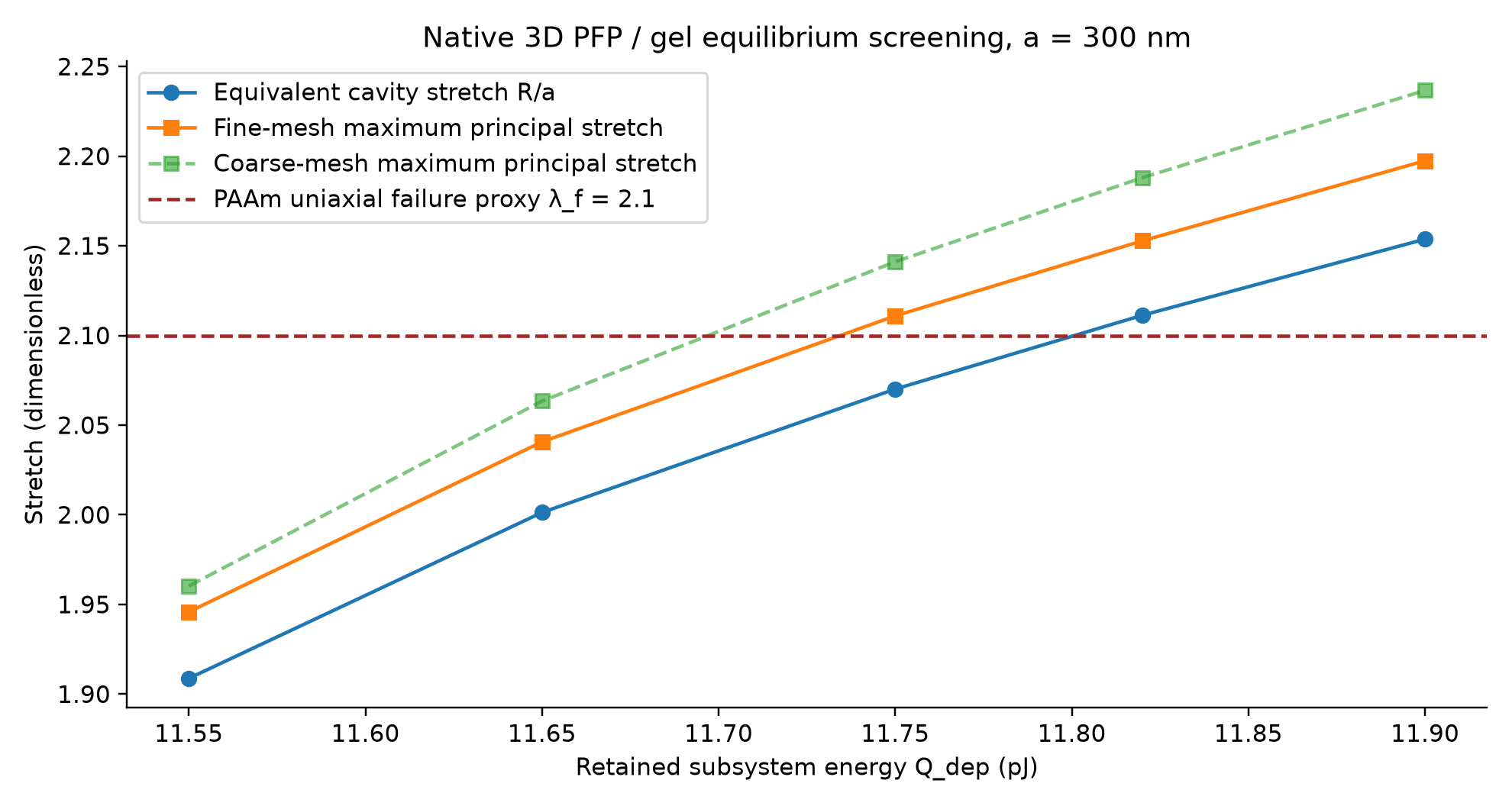
You should see: At 11.65 pJ: stretch≈2.001276; local maximum≈2.040679; Temp≈339.197 K; fv≈0.16813; shell≈24.12 nm. Energy/mass/phase residuals are small and 0<fv<1.
应当看到:11.65 pJ 时:stretch≈2.001276,局部最大≈2.040679,温度≈339.197 K,fv≈0.16813,液壳≈24.12 nm。能量/质量/相态残差小,且 0<fv<1。
If this does not work / 如果这一步不成功
An Undefined variable result often means the wrong dataset/component. Use the full component prefix in this table. The solved data must belong to the study you just computed.
Undefined variable 常见原因是数据集/组件选错。表中使用完整组件前缀,求解数据必须属于刚完成的研究。
| Expression / 表达式 | Display unit / 显示单位 | What it checks / 核对目的 |
|---|---|---|
Qdep | pJ | Retained energy / 保留能量 |
c.stretch | 1 | Equivalent cavity stretch / 等效空腔伸长 |
c.maxd(c.stretchMax) | 1 | Maximum local principal stretch / 最大局部主伸长 |
c.Temp | K | Solved temperature / 求解温度 |
c.fv | 1 | Vapor mass fraction / 汽质量分数 |
c.shellThickness | nm | Liquid-shell thickness / 液壳厚度 |
(c.Qmin-Qdep)/Qdep | 1 | Energy residual / 能量残差 |
c.massResidual | 1 | Mass residual / 质量残差 |
c.pVP-c.pLP-2*sigLV/c.Rg | Pa | Capillary pressure residual / 毛细压力残差 |
c.gLP-c.gVP | J/kg | Chemical residual / 化学残差 |
c.Rg/nucleusFloor | 1 | Distance from numerical floor / 距数值下限比例 |
| Qdep / pJ | Rfree/a | Maximum principal stretch / 最大主伸长 | Interpretation / 判断 |
|---|---|---|---|
| 11.55 | 1.90877 | 1.94586 | Below the chosen proxy / 低于选定替代判据 |
| 11.65 | 2.001276 | 2.040679 | Below with numerical margin / 有数值裕量 |
| 11.75 | 2.070114 | 2.110925 | Borderline; mesh uncertainty / 边缘情形,受网格影响 |
| 11.82 | 2.111288 | 2.152806 | Exceeds proxy / 超过替代判据 |
| 11.90 | 2.153719 | 2.197453 | Exceeds proxy / 超过替代判据 |
F · Plot, export, save and reopen
F · 绘图、导出、保存、重开
45 Plot the local principal stretch
绘制局部主伸长
Right-click Results → 3D Plot Group. Select the stationary dataset and parameter value Qdep=11.65 pJ. Right-click this plot group → Surface. Set Expression = c.stretchMax, Unit = 1, then Plot. For a deformed view, right-click Surface → Deformation, use u,v,w and set Scale factor = 1 rather than an automatic exaggeration.
右击 Results → 3D Plot Group(三维绘图组),选择稳态数据集及 Qdep=11.65 pJ。右击此绘图组 → Surface(表面),Expression = c.stretchMax,Unit=1,Plot。若显示变形,右击 Surface → Deformation(变形),使用 u,v,w,并将 Scale factor 设为 1,避免自动放大。
| Field / 字段 | Select or enter exactly / 精确选择或输入 |
|---|---|
| Expression | c.stretchMax |
| Unit | 1 |
| Deformation scale factor | 1 |
You should see: The inner cavity expands; the outer gel remains free. Patchy color on a spherical surface is discretization variation.
应当看到:内空腔膨胀,外凝胶保持自由;球面斑块颜色来自离散化差异。
46 Export your own result table and image
导出自己的结果表与图像
Click the result table tab and its Export or Save button; choose a CSV filename in your practice folder. For the plot, right-click the 3D Plot Group → Add Image to Export, set a PNG filename, and click Export. If that context item is hidden, use Results → Export → Image and select the plot group as Source.
点击结果表标签及其 Export/保存按钮,在练习文件夹选择 CSV 文件名。图像可右击三维绘图组 → Add Image to Export,设置 PNG 文件名并 Export;若菜单隐藏,用 Results → Export → Image,Source 选择该绘图组。
You should see: Your CSV and PNG open outside COMSOL and show the selected energy/units.
应当看到:CSV 与 PNG 可在 COMSOL 外打开,显示所选能量及单位。
47 Save a checkpoint
保存检查点
Choose File → Save As. Save as Model_B_baseline_solved_my_rebuild.mph in your own practice folder. For subsequent cards use Ctrl+S. Keep the accepted delivered models as reference files.
选择 File → Save As(另存为),在自己的练习文件夹保存为 Model_B_baseline_solved_my_rebuild.mph。后续操作用 Ctrl+S 保存。保留已经交付的模型作为参考。
You should see: Close and reopen this practice file; its five parameter values and result table remain available.
应当看到:关闭并重开此练习文件,五个参数值与结果表仍可访问。
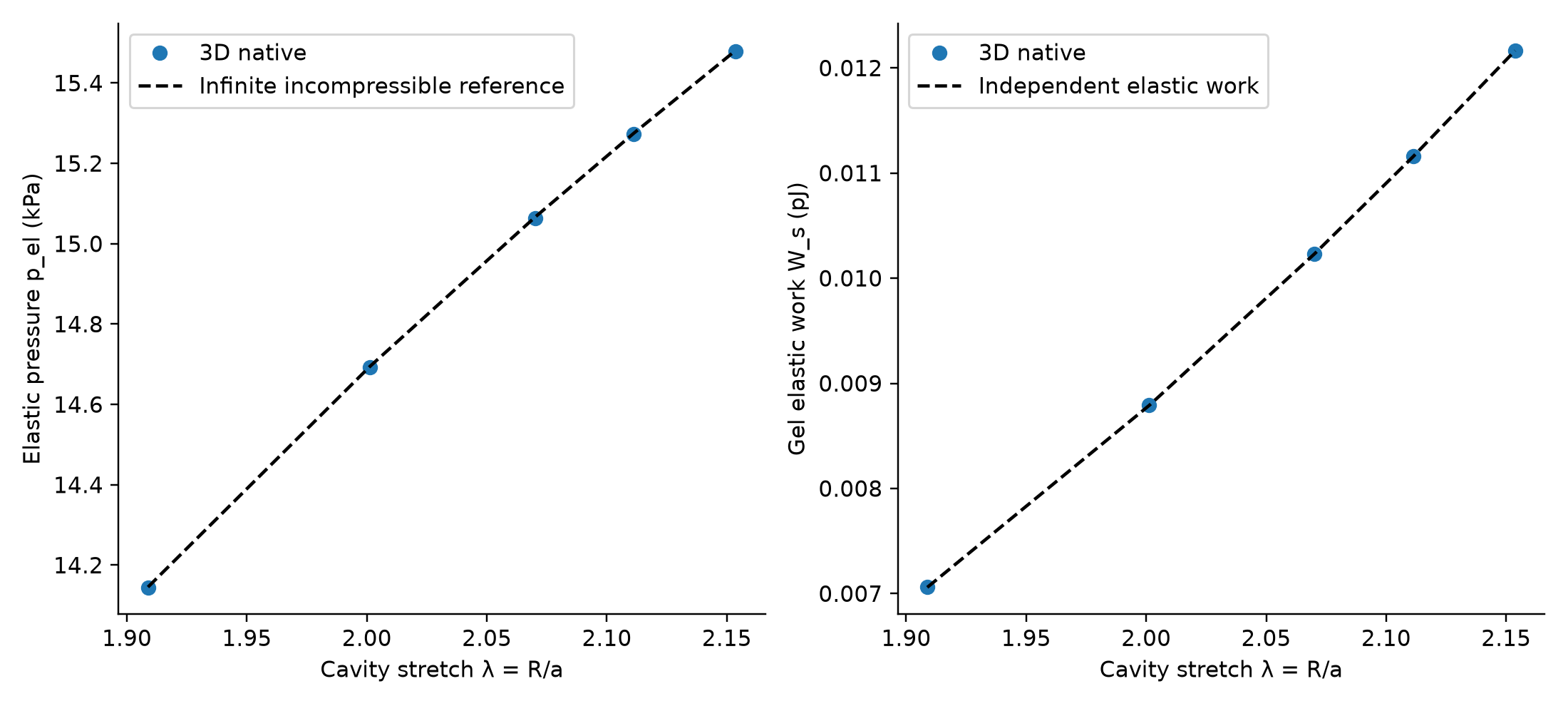
Continue with M4 for the independent elastic control, coarse/fine mesh comparison and the four material/interface sensitivities. The 2.1 limit is a cited uniaxial PAAm proxy; reproducing a result below it does not prove your actual gel survives laser activation.
接着用 M4 完成独立弹性对照、粗细网格比较、四组材料/界面敏感性。2.1 是文献单轴 PAAm 替代判据,复现低于它的结果并不证明真实凝胶能承受激光激活。